 Lidless
 Little Mac tools
The little things
your Mac needs.
All those Terminal one-liners you keep looking up, gathered into one menu bar.
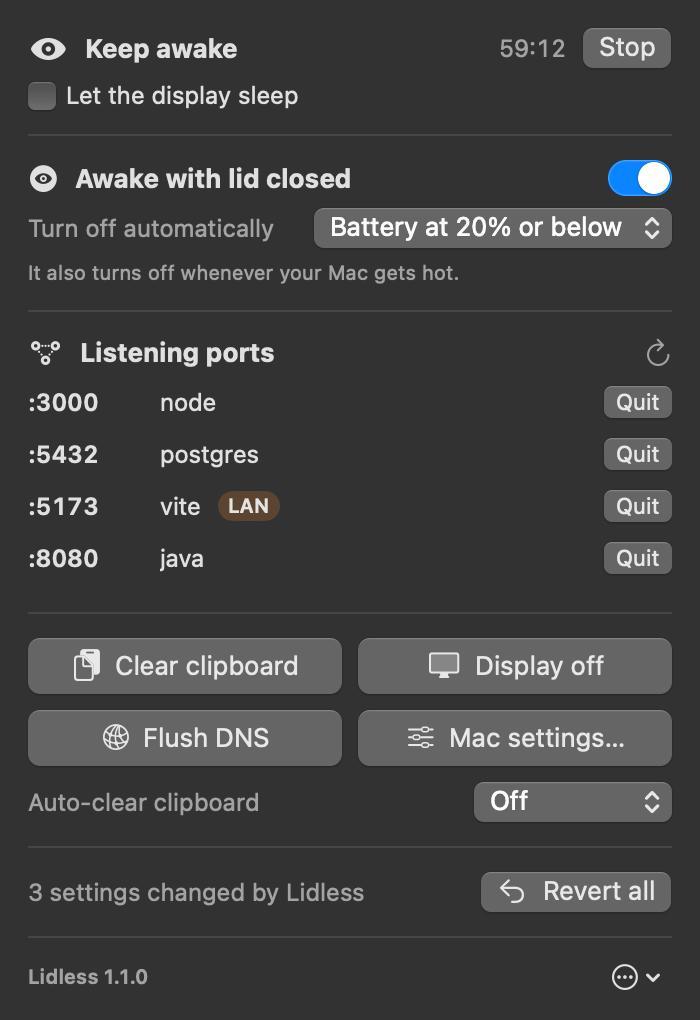
Keep awake, stay on with the lid closed, quit busy ports, clear the clipboard and DNS, flip hidden Mac settings. Anything you change goes back with one click.
Basics are free Pro $4.99 once · 14-day trial
macOS 13 or later · Apple silicon · 9 languages · Apple-notarized. See every tool
On the shelf
Pick what you need.
Free tools stay free. Pro is $4.99 once, after a 14-day trial.
- FreeKeep awake15 minutes to 8 hours, or until an app quits.
- ProAwake with lid closedDownloads, builds and music keep going.
- FreeQuit busy portsEnd whatever is holding port 3000.
- FreeClear clipboardRight now, or 30 s after you copy.
- FreeDisplay offTurn just the display off.
- FreeFlush DNSFor sites that won’t load.
- ProHidden Finder settingsHidden files, path and status bars, extensions.
- ProDock speedAuto-hide delay and speed, hide recent apps.
- ProScreenshot settingsLocation, format, shadow, thumbnail.
- ProKey repeatRepeat rate, hold to repeat.
- Pro.DS_Store cleanupStop making them, and clear a folder.
- Always freeRevert allPuts every changed setting back exactly.
A Pro tool, up close
Close the lid.
Without Lidless the Mac falls asleep;
with it, the download keeps going.
In use
With the lid open, everything runs as usual.
Battery 62% · Lidless turns itself off at 20%
An illustration. This website can’t change your Mac.
The commands you memorized, now buttons.
No more searching for that one-liner, typing your admin password or writing down the original value before you change it.
caffeinate -dKeep awakesudo pmset -a disablesleep 1Awake with lid closedkill -9 $(lsof -ti :3000)Listening ports › Quitpbcopy < /dev/nullClear clipboardsudo killall -HUP mDNSResponderFlush DNSdefaults write com.apple.finder AppleShowAllFiles -bool trueShow hidden filesdefaults delete …Revert all
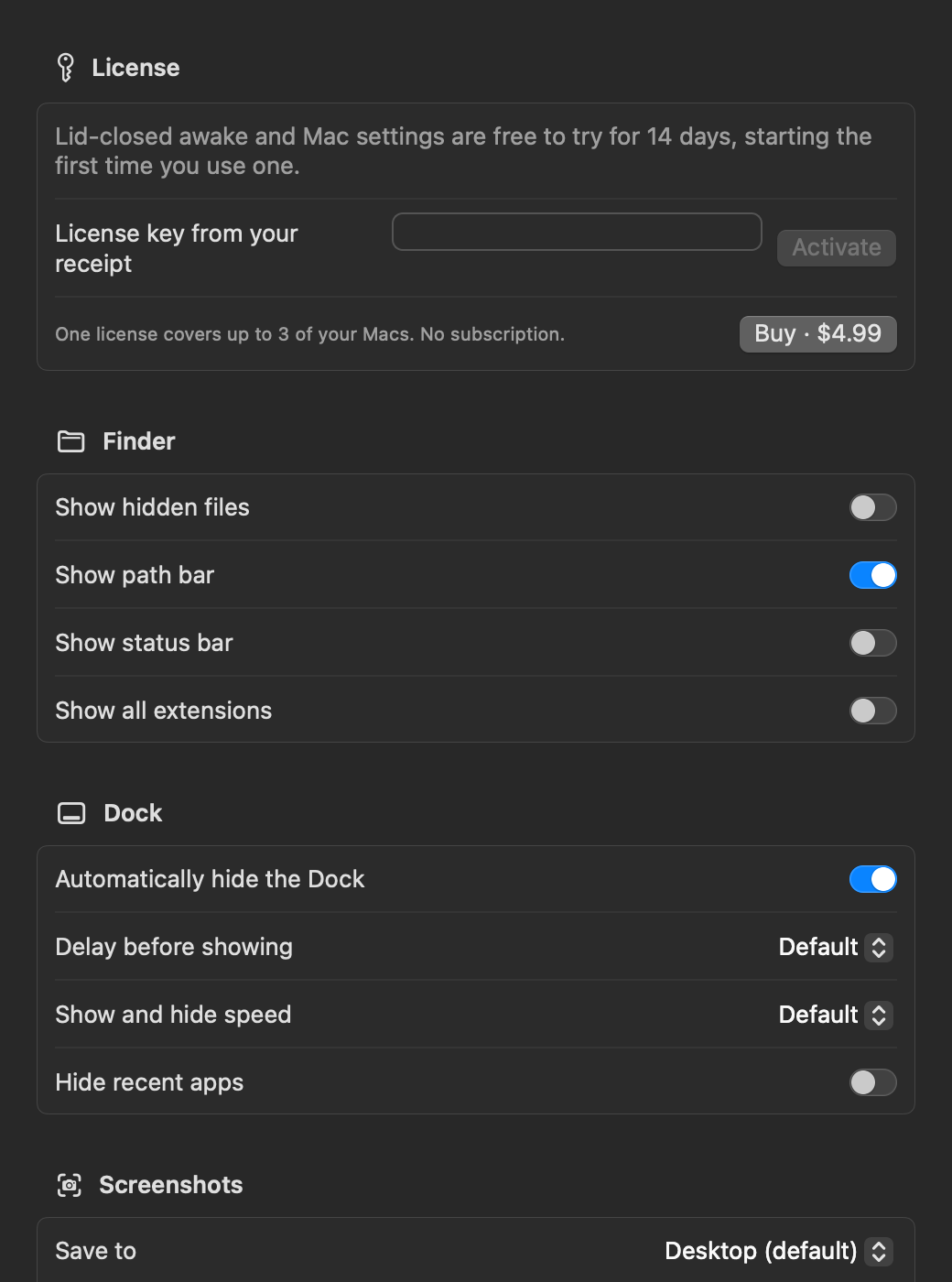
17 hidden Mac settings,
one button to undo.
The defaults tweaks you used to look up are now toggles and menus. Lidless records each original value in its stored form and can restore it exactly at any time.
- Finder: hidden files, path bar, status bar, all extensions
- Dock: auto-hide, delay before showing, speed, hide recent apps
- Screenshots: location, format, window shadow, thumbnail
- Keyboard: key repeat, hold to repeat
- .DS_Store: skip on network and USB drives, clean up a folder
Who’s holding
port 3000?
No more lsof one-liners: see listening ports and their processes, then quit them. Lidless asks politely first and forces only if the process doesn’t respond.
- Ports other devices can reach are marked LAN
- macOS system processes are hidden and protected
- Only your own processes, no admin rights needed
Lid closed,
still safe.
A small helper with admin rights handles blocking sleep. It checks the Mac every 15 seconds on its own, not through the app, so the safety net holds even if the app hangs.
- Allow it once in System Settings › Login Items
- It does two things only: the sleep setting and flushing DNS
- Remove it any time from the ⋯ menu
Lidless 1.1
Basics free.
Pro is $4.99, once.
$4.99 USD · one-time · no subscription
Free: keep awake, listening ports, clipboard, display off, DNS, Revert all
Pro: awake with lid closed, Mac settings · 14-day free trial · up to 3 of your Macs
See the terms & refunds.
The Apple-notarized app will be downloadable from this page soon.
Download coming soon Buy Pro · $4.99Checkout opens soon. Meanwhile, try Pro free for 14 days.
Read the release notesSold by Jino Labs · support@jinolabs.app
Good to know.
Is it safe to put my MacBook in a bag with lid mode on?
Lidless turns lid mode off by itself when the battery reaches your limit (10, 20, 30 or 50%, 20% by default) or the Mac gets hot. The system helper checks every 15 seconds, not the app, so it works even if the app hangs. Still, avoid leaving it on for long in a place without airflow.
Why is there a helper with administrator rights?
Staying awake with the lid closed (pmset disablesleep) and flushing the DNS cache need administrator rights. The helper can do only those two things and talks only to Lidless signed with the same developer certificate. You allow it once in System Settings › General › Login Items and can remove it any time from the ⋯ menu. Everything else needs no permissions.
What happens to lid mode if the app quits unexpectedly?
The setting is tied to the app’s connection, so if Lidless quits or crashes the helper restores sleep right away. Removing the helper or restarting the Mac restores it too. A disablesleep you set yourself in Terminal is left alone.
How do I undo the Mac settings I changed?
Lidless records each setting’s value from before it first changed it, in its stored form. Revert all restores exactly that and deletes settings that didn’t exist. The record survives relaunches.
Does it connect to the internet?
Only to lidless.pages.dev when you activate a license and about once a week to recheck a purchased one, sending just the license key and a random installation ID the app created. No analytics or tracking, and for the clipboard it only checks whether something changed, never what. See Privacy.
Why isn’t it on the App Store?
App Store apps can’t change other apps’ settings or end other processes, so Lidless is distributed from this site. It is signed with a Developer ID and notarized by Apple.
What’s free and what’s Pro?
Keep awake, listening ports, clipboard, display off and DNS flush stay free. Awake with lid closed and Mac settings (Finder, Dock, screenshots, keyboard, .DS_Store) are Pro, free to try for 14 days from first use. Revert all always works, even after the trial.
How does the license work?
$4.99 once lets one person use version 1 and its updates on up to 3 of their Macs. Paste the key from your receipt into License at the top of the Mac settings window. Full refund within 14 days of purchase.